November 20th, 2025
🚀 New Features
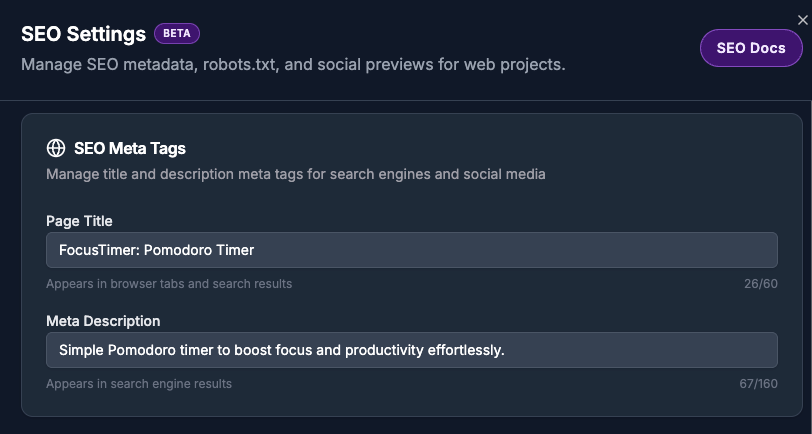
SEO Settings Dashboard - Manage all search engine optimization settings in one place under Project Settings
robots.txt Manager - Control which search engines and AI bots can crawl your site with an intuitive toggle interface
Custom Crawler Control - Add any custom bot or crawler with allow/deny permissions, perfect for niche search engines or proprietary crawlers
Meta Tag Editor - Update page titles and descriptions that appear in search results and social shares, with character counters and real-time validation
Social Preview Integration - Social media preview images and favicons now integrated into the SEO settings panel
Automatic Sitemap - Every web project gets a sitemap.xml file automatically, helping search engines discover all your pages
✨ Improvements
GitHub-integrated SEO - All SEO changes commit directly to your repository, keeping everything in sync with your codebase
Smart Defaults - New projects include all major search engines (Google, Bing, DuckDuckGo) and AI crawlers (GPT, Claude, Gemini) pre-configured
AI-Aware Development - App2 AI now knows to update your sitemap when adding new routes or pages
Instant Updates - Changes to robots.txt and meta tags deploy immediately through your GitHub repository
🐛 Bug Fixes
Fixed issue where social preview updates required an active sandbox (now 5-8x faster using direct GitHub API)
Resolved invalid robots.txt detection incorrectly flagging newly created files
Fixed code generation sessions timing out after exactly 5 minutes for complex applications
November 18th, 2025
🚀 New Features
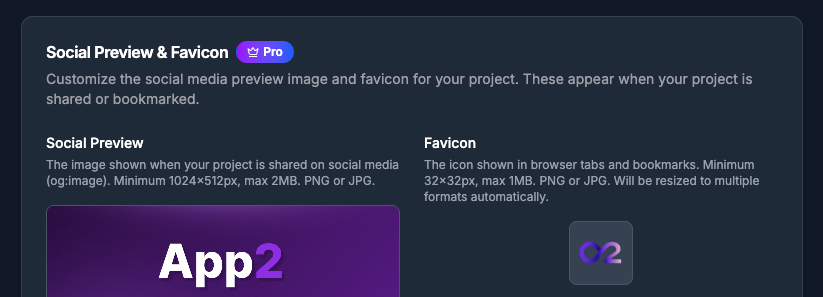
Social Preview & Favicon Customization - Give your projects a professional brand identity. Pro users can now upload custom social media preview images and favicons. When your project is shared on social media or bookmarked by users, it displays your custom branding instead of generic defaults. Upload a social preview image (up to 2MB) that appears in link previews on Twitter, LinkedIn, and other platforms, plus a custom favicon (up to 1MB) that shows in browser tabs and bookmarks.
🐛 Bug Fixes
Fixed issue where chat input would not clear after submitting a message. The input field now clears immediately after sending, making it easier to type your next prompt without manually clearing the previous text.
November 17th, 2025
🚀 New Features
Enhanced File Browser - Browse multiple files with tabbed navigation, download files, copy code snippets, and reference files in chat directly from the file viewer.
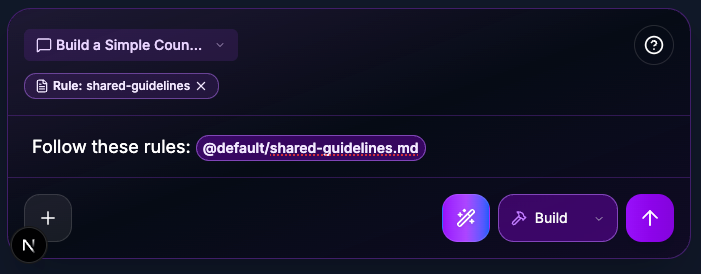
Context Reference - File references in chat now appear as interactive purple chips. Click any reference to jump directly to that file, or press backspace twice to remove it. References are automatically highlighted and easy to manage while you type.
Preview URL Switching - Workspace members can now seamlessly switch between development sandbox previews and live production deployments. Choose between "Sandbox Preview" for testing changes or "Live Preview" to see your production Vercel deployment, with the preview updating instantly when you switch.
React Router Page Navigation - Navigate through your React Router pages directly from the preview panel. Workspace members can now use a searchable dropdown to quickly jump between different routes in their web applications, making it easier to test and review all pages without manually typing URLs.
✨ Improvements
Code Generation Cancellation - You can now stop code generation at any time during follow-up prompts. Click the stop button to immediately cancel generation, revert any uncommitted changes, and receive a clear cancellation message.
Project Creation Feedback - Added "Creating project..." text next to the loading spinner when submitting a project creation prompt, providing clearer visual feedback during the creation process.
Project Not Found Page - Redesigned the project not found and access denied pages with a modern glassmorphic design, improved typography, and clearer navigation options for a better user experience.
Tabbed File Navigation - Browse multiple files simultaneously with browser-like tabs. Open files in separate tabs, switch between them instantly, and close tabs individually. Tabs scroll horizontally with intuitive arrow controls when you have many files open.
File Actions - Download any file directly from the file browser, copy text and code file contents to your clipboard, or reference files in chat with a single click. Copy actions show visual feedback with a checkmark icon, and file references are automatically added to your prompt.
Enhanced File Preview - Code files now display with line numbers for easier navigation. Images and SVG files render correctly with improved support for all file types.
Improved Project Settings Layout - Project settings now have a cleaner, more organized layout. Project information is easier to scan with better visual hierarchy, and preview URLs are now copyable with a single click. Workspace admins and owners can now categorize projects to help with organization and discovery.
Enhanced Project Privacy - Public project viewers now see the production Vercel deployment instead of development sandbox previews.
React Router v7 Pre-installed - All new web React projects now come with React Router v7 pre-installed and ready to use. The AI assistant is now aware of React Router's modern data-driven routing patterns, helping you build better-structured applications with proper navigation.
🔒 Security
Sandbox Access Restrictions - Sandbox data (status, URLs, tokens) is now restricted to workspace members only. Viewers of public projects can no longer access sensitive sandbox information, improving security and privacy.
🐛 Bug Fixes
Fixed issue where newly created projects would briefly show read-only mode until page refresh. Projects now display with correct permissions immediately after creation.
Fixed issue where follow-up code generation prompts would get stuck for 60 seconds before working. Follow-up prompts now start immediately without delays.
Fixed issue where Vercel deployments would fail with "No GitHub account was found matching the commit author email address" error. Commits now use proper email addresses based on repository ownership.
Updated commit author identity to "App2 AI Bot" with dedicated Git email for better GitHub integration and clearer commit attribution.
November 15th, 2025
🚀 New Features
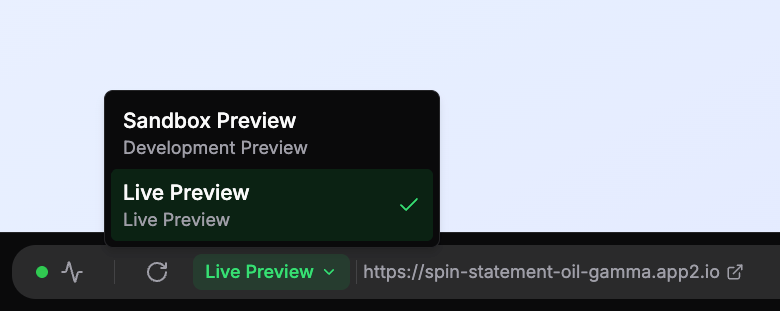
Preview URL Switching - Workspace members can now seamlessly switch between development sandbox previews and live production deployments. Choose between "Sandbox Preview" for testing changes or "Live Preview" to see your production Vercel deployment, with the preview updating instantly when you switch.
React Router Page Navigation - Navigate through your React Router pages directly from the preview panel. Workspace members can now use a searchable dropdown to quickly jump between different routes in their web applications, making it easier to test and review all pages without manually typing URLs.
File Change Visualization - Code changes are now displayed directly in chat messages with a collapsible diff view. See exactly what files were modified, with before/after code comparisons, addition/deletion counts, and file paths - making it easier to understand what the AI changed in your project.
Complete Stripe Management - You can now fully unlink Stripe integrations from projects when you no longer need payment processing. Previously, you could only switch between Stripe accounts but couldn't remove Stripe entirely.
Automatic Integration Cleanup - When you disconnect your Supabase project, any linked Stripe integration is automatically disconnected too, keeping your project configuration clean and preventing orphaned integrations.
✨ Improvements
Enhanced Project Privacy - Public project viewers now see the production Vercel deployment instead of development sandbox previews.
React Router v7 Pre-installed - All new web React projects now come with React Router v7 pre-installed and ready to use. The AI assistant is now aware of React Router's modern data-driven routing patterns, helping you build better-structured applications with proper navigation.
Smarter Session Recovery - Code generation now detects and recovers from stuck sessions automatically. If codegen fails to start generating code within 60 seconds, the system fails fast and provides clear feedback instead of waiting 30 minutes. This means faster error detection and less time waiting for builds that won't complete.
Faster Integration Updates - Linking and unlinking integrations (Vercel, Supabase, Stripe) now updates the UI instantly.
Safer Integration Management - Added confirmation dialogs when disconnecting Vercel deployments, Supabase projects, or Stripe integrations. These modals clearly explain what will happen and require explicit confirmation, preventing accidental data loss.
Mobile Project Clarity - Mobile React Native projects now show clear messaging explaining that Vercel deployments and Stripe integrations are only available for web projects. No more confusing upgrade prompts or misleading options.
Smarter Integration Setup - Stripe integration now requires a Supabase backend to be connected first, ensuring your payment processing has proper data storage and webhook handling from the start. The UI guides you through the correct setup order.
Automatic Supabase Configuration - When you link Vercel deployments or add custom domains, your Supabase authentication settings are automatically updated to match. Site URLs and redirect URIs stay in sync without manual configuration, ensuring your authentication flows work seamlessly across all your domains.
Always Up-to-Date Development Tools - Development environments now automatically update to the latest CLI tools whenever sandboxes are started or restarted. This ensures you always have access to the newest features and improvements without manual updates.
Enhanced Supabase MCP Integration - Supabase backend integration now uses the latest hosted MCP service, providing full access to database operations, migrations, edge functions, and storage management. This ensures you always have the most up-to-date Supabase capabilities without manual updates.
Clearer Sandbox Status Feedback - The typing indicator now prioritizes showing "Starting sandbox..." when your sandbox is waking up, ensuring you always know what's happening. Once the sandbox is ready, it smoothly transitions to showing "Analyzing request" or "Generating code" so you have accurate status updates throughout the process.
Preview Refresh Status - After code generation completes, you'll now see "Refreshing preview..." while the preview server restarts to show your latest changes. This provides clear feedback during the preview update process before suggestions are generated.
Enhanced Project Privacy - Public projects now have clearer access controls. Viewers who aren't workspace members can see the preview and project information, but chat sessions and sandbox controls are restricted to workspace members only. This ensures your project conversations and development tools remain private while still allowing public preview access.
🔒 Security
Sandbox Access Restrictions - Sandbox data (status, URLs, tokens) is now restricted to workspace members only. Viewers of public projects can no longer access sensitive sandbox information, improving security and privacy.
🐛 Bug Fixes
Fixed issue where Vercel deployments would fail with "No GitHub account was found matching the commit author email address" error. Commits now use proper email addresses based on repository ownership.
Updated commit author identity to "App2 AI Bot" with dedicated Git email for better GitHub integration and clearer commit attribution.
Fixed issue where stuck code generation sessions would run for 30+ minutes before timing out
Resolved sessions getting trapped in reconnection loops without performing any actual work
Fixed code generation errors not showing proper error messages - failed sessions now display clear, helpful feedback instead of generic errors
Fixed issue where code generation failures would continue running background tasks (screenshots, predictive prompts) instead of stopping immediately
Fixed delay where integration status wouldn't update immediately after linking or unlinking
Corrected issue where Vercel "connected" banner wouldn't disappear after unlinking
Fixed duplicate buttons and messages appearing for mobile projects in integration settings
Resolved race condition where users could trigger duplicate link operations during UI refresh
Fixed issue where Supabase projects wouldn't reappear in the dropdown after unlinking, requiring a page refresh to re-link
Eliminated confusing UI flickers showing "No available integrations" messages during brief loading periods after linking
Fixed Supabase token expiration issues that could prevent authentication configuration updates
Fixed integration configuration errors that could prevent backend services from connecting properly
Fixed issue where typing indicator wouldn't show "Starting sandbox..." when submitting follow-up prompts while sandbox was paused
Fixed issue where code generation sessions could get stuck permanently if the background job machine ran out of memory
Fixed issue where file changes weren't being displayed correctly in chat messages after extended use
November 9th, 2025
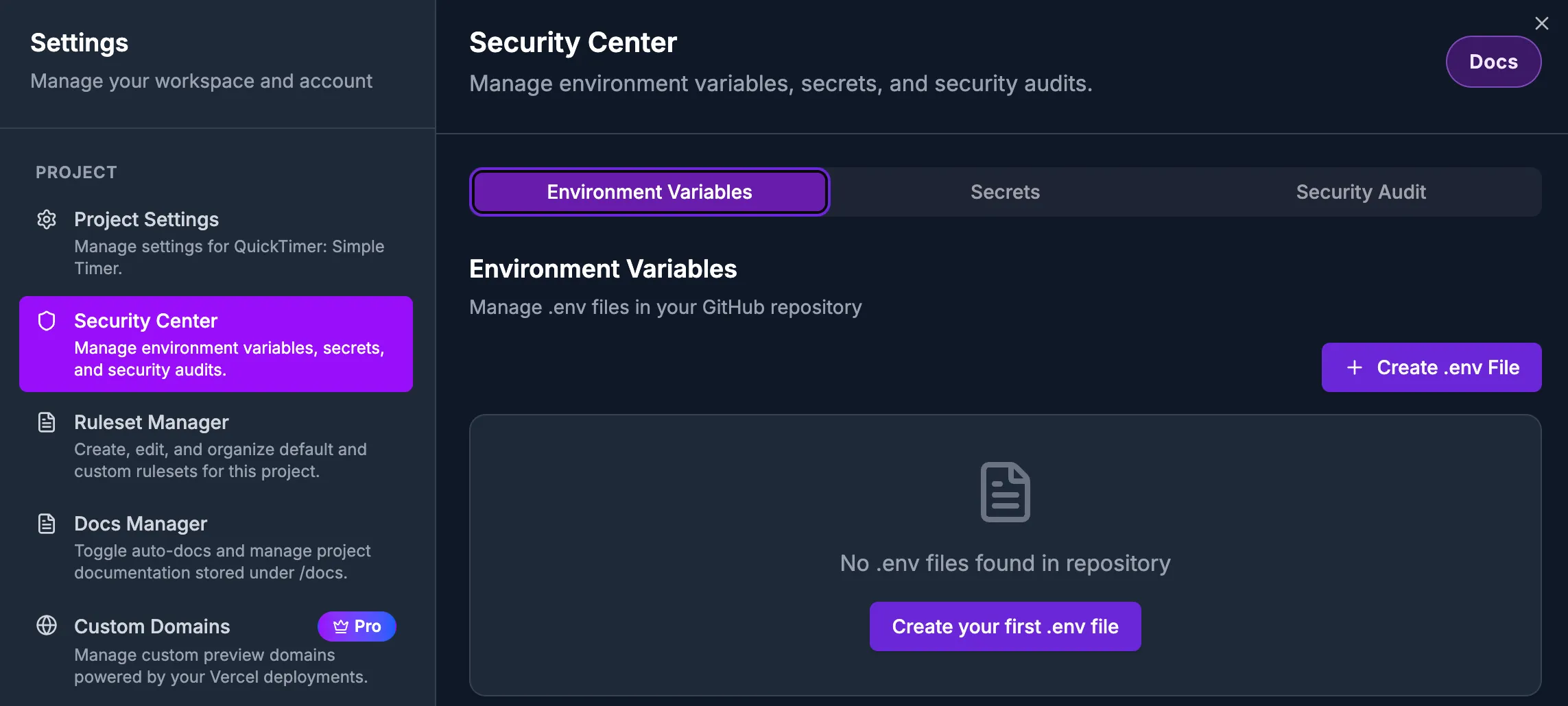
Security Center - Comprehensive security management for your projects, accessible from project settings. The Security Center provides three powerful tabs to keep your apps secure:
Environment Variables: Create, edit, and delete .env files via App2. Manage environment variables with an intuitive interface, validation for proper naming, and a two-step confirmation process when deleting files to prevent accidents.
Secrets: Manage Supabase secrets provisioned via App2. Keep your sensitive configuration secure and properly organized for production deployments.
Unlink Integrations - You can now disconnect Vercel deployments and Supabase backends from your projects when you no longer need them. Unlinking is safe and reversible - you can always reconnect to the same or different integrations later. Currently in Beta testing, there may be unintended side effects.
✨ Improvements
Easier Settings Navigation - Project settings now feature clickable links throughout. Click repository names to jump to GitHub, click Supabase project names to manage integrations, and click linked App2 projects to view them directly.
Clearer Supabase Organization Display - Supabase organization settings now clearly distinguish between your Supabase projects and which App2 projects are using them, making it easier to understand your integrations at a glance.
Enhanced Integration Status - Vercel and Supabase integration banners now show richer information including when you first linked them, which team or organization they're connected to, and when they last synced. This makes it easier to understand your project's infrastructure at a glance.
Better Error Guidance - When linking Vercel deployments, you'll now receive clear, actionable error messages if the Vercel GitHub App isn't installed, with direct links to installation instructions.
More Reliable Integration Operations - Linking and unlinking integrations is now more stable and prevents issues with concurrent operations. Your projects are temporarily protected during these operations to ensure data consistency.
Automatic Deployment Trigger - When you link a Vercel deployment, we now automatically trigger the first production deployment so you can see your app live immediately.
More Reliable Figma Imports - Enhanced Figma authentication checks now validate your connection status more frequently and verify tokens actually work before starting imports. This prevents failed imports due to expired credentials, ensuring a smoother design-to-code experience.
🐛 Bug Fixes
Fixed issue where successfully linked Supabase projects wouldn't display immediately in project settings
Resolved unnecessary analytics events that occurred when loading Supabase organizations
Fixed duplicate API calls when linking Vercel deployments that could cause conflicts
Fixed page crashes when Vercel GitHub App wasn't installed - now shows helpful error banner instead
Resolved database errors during Vercel project creation
Fixed integration status banners not updating immediately after linking
Fixed Figma import failures caused by expired authentication tokens - imports now validate your Figma connection before starting to prevent mid-import failures
November 1st, 2025
October 31, 2025 - Halloween Special 🎃
🚀 New Features
GitHub Repository Migration - Migrate your App2-hosted repositories to your own GitHub organization with real-time progress tracking. Watch as your repository is created, code is pushed, and environment is configured—all with a live progress bar and step-by-step updates. Transfer ownership of your code while keeping all git history, branches, and commits intact. The entire process takes 30-60 seconds and happens in the background, so you can continue using the app while migration completes.
✨ Improvements
Real-time Migration Progress - GitHub repository migration now shows live progress updates with a visual progress bar. See exactly what's happening at each step: getting credentials, creating repository, preparing environment, pushing code, restarting preview, and saving settings. No more waiting in the dark—you'll know the exact status at every moment.
Automatic UI Updates - Repository information cards now update automatically when migrations complete. No page refresh needed—your GitHub settings refresh instantly when the migration finishes, showing your new user-owned repository immediately.
Faster Migration - Repository migration is now 30-60 seconds faster by optimizing how development environments are prepared. The migration happens in the background, letting you continue working while it completes.
Vercel Integration Console - Managing Vercel teams now feels on par with our GitHub integration. The settings page uses an accordion layout with copyable team IDs and slugs, quick links to Vercel, and a full list of linked App2 projects so you can see where each team is in use at a glance.
Clear Success Feedback - Connecting new Vercel or Stripe teams now fires a green success toast, making it obvious when credentials pass validation.
Project Settings Navigation - Project settings now feature deep-linked sub-sections with a sidebar that highlights your current position. Buttons like “Link Vercel Deployment” jump directly to the right spot, while manual scrolling keeps your place without snapping back.
Preview & Custom URL Overview - The project summary now shows the active sandbox preview link plus any custom domain URL (with copy/open actions). If no custom domain exists, a handy “Add Custom URL” shortcut points you to the setup flow.
Stripe Payments Panel Refresh - The Stripe section matches the Vercel/GitHub look and lets you choose or switch between workspace integrations right inside project settings.
Better Error Messages - GitHub and integration errors now display helpful, actionable messages instead of technical codes. You'll see exactly what went wrong and how to fix it.
🐛 Bug Fixes
Fixed an issue that sent expired sessions to a missing
/sign-inpage. You now land on the login screen with a clear message and jump straight back to your work after signing in.Fixed error messages displaying as "[object Object]" when GitHub operations failed. You now see clear, helpful error descriptions.
Fixed repository migration failing with git push errors. Migrations now complete successfully without conflicts.
‼️ Important Notes
GitHub repository migration currently supports organizations only. Personal GitHub accounts are not yet supported. You can create a free GitHub organization at github.com/account/organizations/new to use this feature.
October 30th, 2025
🚀 New Features
Message History Navigation - Quickly recall previous prompts using keyboard shortcuts. Press the up arrow (↑) to cycle through your recent messages, down arrow (↓) to navigate forward, and Escape to return to your draft. Works just like your terminal for a familiar, efficient workflow.
✨ Improvements
Quick Access to Documentation - Added a help button in the project chat input that opens documentation in a new tab, making it easier to find answers while building your project.
Better Success Feedback - Context7 API key saves now show a green success notification, making it clearer when your integration is configured correctly.
Enhanced GitHub Integration Settings - Completely redesigned GitHub organization management with collapsible sections showing linked projects, interactive copy-paste for IDs, and direct links to GitHub installation settings. See which projects are connected to each organization at a glance.
Improved Integration Settings - Added helpful tooltips to refresh buttons and consistent button styling across Vercel, Stripe, and Figma integration settings for a more polished experience.
Smoother Loading States - Integration settings now show elegant loading skeletons instead of content flashing, providing a more professional and pleasant experience while data loads.
🐛 Bug Fixes
Fixed issue where read-only users could click action buttons in chat response templates, even though they lacked permission to perform actions in the project
Fixed issue where PLAN mode chat responses were not displaying, causing the AI to appear unresponsive when creating implementation plans
Fixed issue where chat mode selector would appear blank after page refresh when a mode other than BUILD was selected
Fixed issue where Context7 API keys could not be validated properly, preventing users from enabling Context7 integration for their workspaces
Fixed GitHub Integration for Personal Accounts - Resolved critical issues preventing users with personal GitHub accounts from using the platform:
GitHub organizations are now saved correctly during connection flow, fixing silent failures that prevented account linking
Project linking to personal GitHub accounts now works seamlessly - you can fork and deploy projects to your personal GitHub account just like organization accounts
Settings modal automatically opens after successful GitHub connection, showing your connected organizations immediately
GitHub integration now works correctly across all environments (local, staging, production)
Fixed Integration Documentation Links - Corrected outdated guide links for Figma, Vercel, Stripe, and Custom Domains. All "View integration guide" links now direct to the correct help articles.
October 27th, 2025
Improved
Fixed
🚀 Improvements
TODO Checklist - See App2's progress in real-time with visual task checklists. Watch as tasks are automatically checked off when completed, with status indicators showing pending, in-progress, and completed items. Makes it easy to track what App2 is working on and what's already done.
Faster AI Reasoning - Upgraded to GPT-5 Mini across the platform for significantly faster processing and more cost-effective operations. This means quicker Figma imports, faster intent detection, and smoother file analysis with 58% cost reduction.
More Reliable Figma Imports - Moved Figma import processing to background jobs for better reliability and scalability. Long-running imports now process seamlessly without timeouts, with real-time progress updates keeping you informed every step of the way. Import designs with 50+ screens without worrying about timeouts. Project creation and code generation also use background processing for unlimited duration, and you can cancel operations even before they start executing.
Enhanced Figma Import Progress - See exactly what's happening during your Figma import with detailed progress tracking:
Live scene-by-scene analysis updates showing which screens are being processed
Clear visibility into context generation and prompt preparation stages
Expandable scene list to track each analyzed screen
Automatic retry handling for transient errors - imports recover gracefully without manual intervention
Completed steps now show past tense (e.g., "Analyzed" instead of "Analyzing") for clearer progress indication
Smarter Error Recovery - Figma imports now automatically retry when encountering temporary issues like network errors. You'll see a notification if a retry is happening, but most issues resolve themselves without disrupting your workflow.
Enhanced Chat Experience - Improved how directory listings are displayed in chat. When Claude lists files, you now see an interactive file tree with folder icons, file type indicators, and collapsible directories - making it much easier to understand project structure at a glance.
Live Preview Updates - Preview servers now automatically restart after each code generation, ensuring you always see your latest changes without manual refresh.
Always-Accessible Preview Controls - Preview toolbar is now always visible, even during loading or error states. You can restart or recreate sandboxes at any time without waiting for preview to load, giving you control to fix stuck states immediately.
Clearer AI Mode Behavior - Improved how AI responds when using different chat modes (Debug, Plan, Review, Docs). The AI now focuses more clearly on your actual request instead of mixing mode instructions with your task, leading to more accurate and helpful responses.
Clearer Status Messages - Know exactly what's happening. When your sandbox needs to wake up, you'll now see "Starting sandbox" instead of a confusing "Analyzing..." message. This gives you better visibility into what's actually happening during code generation.
Better Community Discovery - Web-based project cards now display project categories alongside mobile app cards, making it easier to find projects in your area of interest when browsing the community gallery.
Accurate User Identification - Chat avatars now correctly display the initials of the person who sent each message, not the currently logged-in user. This is especially helpful when viewing shared projects or working in collaborative workspaces.
Faster Project Creation - New projects now build faster with optimized background processing. Message simplification runs independently, improving reliability, and reducing wait times during initial project setup.
Improved Code Generation Performance - Code generation operations complete more quickly by processing message simplification in the background instead of blocking. This means you see your code changes faster and can iterate more efficiently.
🐛 Bug Fixes
Fixed issue where Figma import modal would show stale data when reopening after a completed import
Corrected scene count display during Figma imports to accurately show progress (e.g., "15 of 15" instead of "14 of 15")
Fixed workspace projects list not updating immediately after deleting a Figma project
Improved project creation reliability by preventing orphaned resources when background tasks fail to start
Fixed issue where attempting to cancel a project or code generation immediately after starting wouldn't work
Fixed preview servers not showing latest code changes after multiple code generation requests
Improved handling of cancelled operations
Fixed issue where preview toolbar would be hidden off-screen when visibility banners were shown
Fixed preview failing to start after resuming stopped sandboxes due to missing dependencies
Resolved layout issues where banners would push important controls below the viewport
Improved privacy protection for deleted projects - deleted projects are no longer accessible via direct links
Fixed issue where REVIEW mode sessions would fail behind the scenes with "empty commit" errors when pushing to GitHub
Fixed an issue where simplified message explanations would sometimes fail to generate, especially for long conversations. Currently monitoring for potential regressions.
Fixed Session Persistence - Your session now stays active even after leaving the app open overnight. When you return to a tab that's been idle for hours, the app automatically refreshes your authentication in the background, so you can pick up right where you left off without having to sign in again.
Smoother Performance - Reduced unnecessary background requests by 95% when working on projects. The app now intelligently manages data updates, resulting in faster load times and a more responsive experience throughout your workflow.
Fixed BYOK Validation - Fixed an issue where validating your own OpenAI, Anthropic, or Azure API keys would fail. You can now successfully connect your own LLM credentials to use with App2Dev.
Reliable Sandbox Resumption - Resuming a previously stopped sandbox now works smoothly even when you have uncommitted changes. The app automatically preserves your work by committing it to GitHub before syncing, so you never lose progress and can pick up exactly where you left off.
Better Error Messages - Fixed an issue where permission errors would incorrectly ask you to sign in again. When you try to access a project or workspace you don't have permission for, you now see a clear "Access Denied" message instead of being sent back to the login page.
October 23rd, 2025
New
Improved
Fixed
✨ New Features
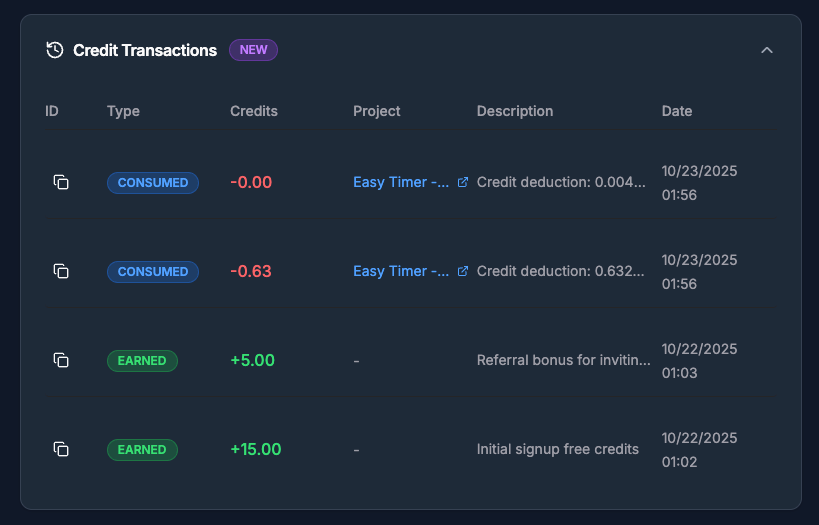
Credit Transaction History - Track your credit usage with detailed transaction history. View all credit earnings and spending in one place, see which projects consumed credits, and monitor your account activity. Access the new collapsible Credit Transactions section in billing settings to view your complete transaction history with pagination support.
Real-Time Tool Visibility - See exactly what's happening as it happens. File paths, commands, and operation details appear immediately in chat, even while tools are running. No more guessing what the AI is working on.
Smarter Permission System - Common development commands now execute automatically without interruption, while maintaining security. Navigate directories, view files, and run linters without permission prompts.
🚀 Improvements
Faster Code Generation - Optimized timeout handling gives complex builds the time they need. Long-running operations complete successfully instead of timing out prematurely.
Better Tool Context - Each tool operation now shows relevant details instantly: file paths for edits, command descriptions for bash operations, search patterns for queries.
Streamlined Workflow - Reduced permission interruptions for safe commands means fewer clicks and faster iteration during development.
Smarter Figma Import - Paste any Figma URL directly into the project creation input. App2 automatically detects Figma links and opens the import modal pre-filled and ready to go—no more manual copying.
Enhanced Message Simplification - Improved reliability of the message simplification system that makes technical AI responses easier to understand.
Better Error Recovery - Advanced JSON repair capabilities now automatically fix common formatting issues in AI responses, reducing errors and improving the overall chat experience.
Improved Cost Tracking - Enhanced accuracy and consistency of credit cost calculations across all features. Session totals now include costs from all operations, and credit values display with consistent precision.
🐛 Bug Fixes
Fixed code generation sessions timing out during long builds, even when work was progressing normally
Resolved missing file path information in pending tool operations
Corrected unnecessary permission prompts for routine development commands
Fixed sandbox previews not being accessible to read-only users viewing public projects - visitors can now see project previews without workspace membership
Fixed "Restart preview" failing behind the scenes resulting into sandbox recreation instead of resumption - sandbox restarts now work reliably, ensuring your preview is always up-to-date with the latest code
Fixed session credit costs not including predictive prompting suggestions
Fixed session credit costs not including prompt enhancements
Corrected credit cost precision to display
🔒 Security
Enhanced protection with intelligent threat detection and comprehensive audit logging
Developer Productivity: These updates are designed to get you building faster with fewer interruptions, while keeping your projects secure.
October 20th, 2025
New
We're excited to announce that App2.dev is officially available to everyone in Early Access!
Our AI-powered platform transforms your ideas and Figma designs into production-ready web and mobile applications. Whether you're a solo developer, a growing team, or an enterprise, App2 helps you ship faster.
What is App2?
App2 is an AI-powered development platform that builds mobile and web applications from natural language descriptions and Figma designs. You describe what you want to build, and the AI generates production-ready code in secure sandboxes.
Build through conversation - Chat with AI to implement features, fix bugs, or refactor code Import from Figma - Convert your mobile app designs directly into React Native/Expo code Deploy with one click - Push to GitHub and deploy to Vercel automatically Collaborate with your team - Work together in shared workspaces with up to 50 members
Choose Your Plan
🆓 Free
Perfect for learning, experimenting, and building open-source projects.
What you get:
5 daily credits (resets every 24 hours, up to 25 per month)
Unlimited public projects
Full access to AI code generation (Claude, OpenAI, Gemini)
Community project showcase
Web (React/Vite) and Mobile (Expo) templates
⭐ Pro - $25/month
Save 17% with annual billing: $200/year
Everything in Free, plus:
100 monthly credits (no daily limits, never expire)
Private projects with access control
Team collaboration with up to 5 workspace members
Custom domains for your deployed apps
Full integration access: Vercel, Supabase, Figma, Stripe and more!
Advanced features: Predictive prompting (up to 3 suggestions), Rulesets, Autodocs
Credit rollover - unused credits carry over indefinitely
💎 Lifetime Pro - $400 one-time
Lock in Pro features forever with a single payment.
Everything in Pro, plus:
2,400 total credits (100/month for 2 years)
Permanent Pro status (even after credits are used)
BYOK (Bring Your Own Keys) - Use your own OpenAI, Anthropic (Claude), or Gemini API keys
Early access to new features
Limited slots available
How Credits Work
Credits power every action on App2, from AI code generation to deployments and integrations.
What consumes credits:
AI code generation and modifications
Figma imports and image analysis
Deployments and builds
AI-powered features (Predictive Prompting, etc.)
Credit types:
Free credits (Free tier only)
5 credits per day, resets at midnight UTC
Maximum 25 credits per month
Cannot roll over to next day
Subscription credits (Pro/Lifetime)
100 credits per month
Never expire, roll over indefinitely
No daily limits - use them all in one day if needed
Purchased credits
Buy additional credits in packages (100-800 credits)
Never expire
Available to all tiers
$25 per 100 credits
For power users: Pro subscribers can purchase additional credits at $25 per 100 credits. Need more? Check out our credit packages ranging from 100 to 800 credits.
Platform Features
🤖 AI-Powered Development
Chat Modes for every task:
Build Mode - Write and modify code to implement features
Plan Mode - Create implementation plans without writing code (save credits!)
Debug Mode - Troubleshoot and fix issues systematically
Review Mode - Get code quality feedback and optimization suggestions
Docs Mode - Create and maintain project documentation
Multiple AI models: App2 uses Claude (Anthropic), OpenAI GPT-5, and Gemini for different operations, automatically selecting the best model for each task.
🎯 Smart Features
Predictive Prompting - Get AI-suggested next steps after every build
Free tier: 1 suggestion per response
Pro tier: Up to 3 suggestions per response
Context-aware prompts tailored to your project
Rulesets - Guide AI to follow your coding standards
Define naming conventions, architecture patterns
Enforce best practices across your project
Custom and default rulesets in your GitHub repo
Autodocs - Keep documentation up-to-date automatically
AI maintains docs in
/docs/folder as it writes codeUpdates relevant documentation with every change
Markdown-based documentation system
Context Groups - Better organization and reuse of your project contexts
Group related files and components together
Provide focused context to the AI during generation
Organize conversations by purpose or feature
Chat Sessions - Multiple conversation threads per project
Organize work by feature, purpose, or team member
Inherit context from parent sessions
Switch seamlessly between different workstreams
Quick Actions - Instant access to project tools
Upload files and images for AI analysis
Reference docs, rulesets, and files with @mentions
Browse project structure
Manage integrations
Navigate Figma scenes
🏗️ Templates
Web Apps (React 19 + Vite)
Modern single-page applications
Tailwind CSS and shadcn/ui components
React Router for navigation
Production-ready build pipeline
Mobile Apps (React Native + Expo)
Cross-platform iOS and Android apps
React Navigation
Native device features
Over-the-air updates
Coming soon: Flutter support for mobile development
🔗 Powerful Integrations
GitHub - Automatic repository creation and code sync
App2-managed repositories (all tiers)
User-owned repositories (Pro tier, required for custom domains)
Full version control
Clone and work locally anytime
Vercel - One-click deployments
Automatic preview URLs
Custom domain support (Pro tier)
Environment variable management
Continuous deployment from GitHub
Supabase - Backend-as-a-Service integration
Connect your own Supabase project
Database, authentication, storage, edge functions
AI understands your schema
Automatic query and mutation generation
Figma - Design-to-code conversion
OAuth authentication
Import mobile app designs (web support coming soon)
AI-powered scene analysis and implementation
Frontend and backend phase separation
Stripe - Payment processing
Implement payment flows via AI
Subscription management
Available on Pro tier
Context7 - Up-to-date library documentation
MCP server integration
Access current docs for any library
Improves AI code generation accuracy
Available to all tiers
Reddit - Create projects from r/app2dev
Post with "Create App" flair
Bot responds with project link
Supports
/retryand/promptcommands
👥 Team Collaboration
Workspace Features:
Share projects, credits, and integrations
Centralized billing for the whole team
Real-time collaboration
Track credit usage by team member
Roles and Permissions:
Owner - Full control including billing and workspace management
Admin - Manage team, integrations, and settings (but not billing)
Member - Create and edit projects, use workspace credits
Collaborator Limits:
Free: 1 (owner only)
Pro/Lifetime: Up to 5 collaborators
Primary vs Secondary Workspaces:
Primary workspace receives 25 free credits/month (Free tier)
Pro users can create unlimited secondary workspaces
Each workspace has independent billing and credit pools
🔒 Private Projects
Pro and Lifetime subscribers get:
Complete privacy and access control
Hidden from community showcase
Private GitHub repositories
Preview URLs restricted to workspace members
Perfect for client work and proprietary apps
Public projects (all tiers):
Showcase your work in the community
Build your developer portfolio
Anyone can view and fork
Great for learning and open-source
🌐 Custom Domains
Pro and Lifetime users can:
Use your own domain names (app.yourdomain.com)
Professional branding for client projects
Automatic SSL certificates via Vercel
Support multiple domains per project
Configure in Vercel dashboard
What You Can Build
Web Applications:
SaaS platforms and dashboards
E-commerce stores with Stripe integration
Content management systems
Portfolio and landing pages
Real-time collaborative tools
API-driven applications
Mobile Applications:
Social networking apps
Task and productivity apps
Health and fitness trackers
E-commerce mobile experiences
Location-based services
Media and entertainment apps
Full-Stack Projects:
Apps with Supabase backend (auth, database, storage)
Real-time applications with subscriptions
Multi-tenant platforms
Payment-enabled applications
Enterprise dashboards
Development Workflow
Start your project - Describe your app idea or import a Figma design
AI generates code - Watch your app come to life in a secure sandbox
Preview in real-time - See changes instantly with live preview URLs
Collaborate with your team - Multiple developers working together
Deploy to production - One-click deployment to Vercel with custom domains
Iterate and improve - Use Debug and Review modes to refine your app
What's in Development
We're actively working on exciting new features:
Premium App Templates Library - Pre-built templates for common use cases
SaaS starter kits
E-commerce templates
Social media apps
Admin dashboards
Flutter Support - Mobile development with Flutter framework
Figma Web Support - Convert Figma designs to React web apps (currently mobile only)
App Store Submission - Submit directly to iOS App Store and Google Play Store
Check out our full Roadmap at feedback.app2.dev to see what we're building and vote on features you'd like to see prioritized. Your feedback directly shapes our development!
Getting Started
Sign up at App2.dev
Choose your template - Web (React/Vite) or Mobile (Expo)
Start building - Describe your idea or import a Figma design
Preview and iterate - Refine through conversation with AI
Deploy - Push to GitHub and deploy to Vercel with one click
Need Help?
Documentation - Comprehensive guides available in-app and at docs.app2.dev
Community - Join our Discord at app2.dev/discord
Feedback & Bugs - Report at feedback.app2.dev - we actively monitor and respond to all feedback
Support - Email us at hello@app2.dev
Ready to Turn Your Ideas into Apps?
Whether you're building your first app or your hundredth, App2 helps you ship faster with the power of AI.
Get started today at App2.dev
App2 is continuously evolving based on user feedback. Check our roadmap at feedback.app2.dev to see what's coming next and vote on your most-wanted features!