November 15th, 2025
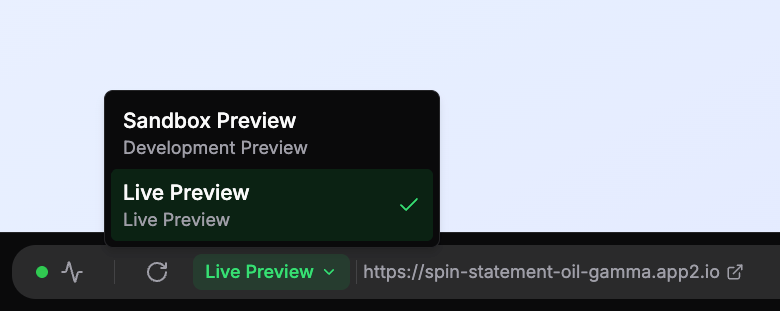
Preview URL Switching & Live Previews
🚀 New Features
Preview URL Switching - Workspace members can now seamlessly switch between development sandbox previews and live production deployments. Choose between "Sandbox Preview" for testing changes or "Live Preview" to see your production Vercel deployment, with the preview updating instantly when you switch.
React Router Page Navigation - Navigate through your React Router pages directly from the preview panel. Workspace members can now use a searchable dropdown to quickly jump between different routes in their web applications, making it easier to test and review all pages without manually typing URLs.
File Change Visualization - Code changes are now displayed directly in chat messages with a collapsible diff view. See exactly what files were modified, with before/after code comparisons, addition/deletion counts, and file paths - making it easier to understand what the AI changed in your project.
Complete Stripe Management - You can now fully unlink Stripe integrations from projects when you no longer need payment processing. Previously, you could only switch between Stripe accounts but couldn't remove Stripe entirely.
Automatic Integration Cleanup - When you disconnect your Supabase project, any linked Stripe integration is automatically disconnected too, keeping your project configuration clean and preventing orphaned integrations.
✨ Improvements
Enhanced Project Privacy - Public project viewers now see the production Vercel deployment instead of development sandbox previews.
React Router v7 Pre-installed - All new web React projects now come with React Router v7 pre-installed and ready to use. The AI assistant is now aware of React Router's modern data-driven routing patterns, helping you build better-structured applications with proper navigation.
Smarter Session Recovery - Code generation now detects and recovers from stuck sessions automatically. If codegen fails to start generating code within 60 seconds, the system fails fast and provides clear feedback instead of waiting 30 minutes. This means faster error detection and less time waiting for builds that won't complete.
Faster Integration Updates - Linking and unlinking integrations (Vercel, Supabase, Stripe) now updates the UI instantly.
Safer Integration Management - Added confirmation dialogs when disconnecting Vercel deployments, Supabase projects, or Stripe integrations. These modals clearly explain what will happen and require explicit confirmation, preventing accidental data loss.
Mobile Project Clarity - Mobile React Native projects now show clear messaging explaining that Vercel deployments and Stripe integrations are only available for web projects. No more confusing upgrade prompts or misleading options.
Smarter Integration Setup - Stripe integration now requires a Supabase backend to be connected first, ensuring your payment processing has proper data storage and webhook handling from the start. The UI guides you through the correct setup order.
Automatic Supabase Configuration - When you link Vercel deployments or add custom domains, your Supabase authentication settings are automatically updated to match. Site URLs and redirect URIs stay in sync without manual configuration, ensuring your authentication flows work seamlessly across all your domains.
Always Up-to-Date Development Tools - Development environments now automatically update to the latest CLI tools whenever sandboxes are started or restarted. This ensures you always have access to the newest features and improvements without manual updates.
Enhanced Supabase MCP Integration - Supabase backend integration now uses the latest hosted MCP service, providing full access to database operations, migrations, edge functions, and storage management. This ensures you always have the most up-to-date Supabase capabilities without manual updates.
Clearer Sandbox Status Feedback - The typing indicator now prioritizes showing "Starting sandbox..." when your sandbox is waking up, ensuring you always know what's happening. Once the sandbox is ready, it smoothly transitions to showing "Analyzing request" or "Generating code" so you have accurate status updates throughout the process.
Preview Refresh Status - After code generation completes, you'll now see "Refreshing preview..." while the preview server restarts to show your latest changes. This provides clear feedback during the preview update process before suggestions are generated.
Enhanced Project Privacy - Public projects now have clearer access controls. Viewers who aren't workspace members can see the preview and project information, but chat sessions and sandbox controls are restricted to workspace members only. This ensures your project conversations and development tools remain private while still allowing public preview access.
🔒 Security
Sandbox Access Restrictions - Sandbox data (status, URLs, tokens) is now restricted to workspace members only. Viewers of public projects can no longer access sensitive sandbox information, improving security and privacy.
🐛 Bug Fixes
Fixed issue where Vercel deployments would fail with "No GitHub account was found matching the commit author email address" error. Commits now use proper email addresses based on repository ownership.
Updated commit author identity to "App2 AI Bot" with dedicated Git email for better GitHub integration and clearer commit attribution.
Fixed issue where stuck code generation sessions would run for 30+ minutes before timing out
Resolved sessions getting trapped in reconnection loops without performing any actual work
Fixed code generation errors not showing proper error messages - failed sessions now display clear, helpful feedback instead of generic errors
Fixed issue where code generation failures would continue running background tasks (screenshots, predictive prompts) instead of stopping immediately
Fixed delay where integration status wouldn't update immediately after linking or unlinking
Corrected issue where Vercel "connected" banner wouldn't disappear after unlinking
Fixed duplicate buttons and messages appearing for mobile projects in integration settings
Resolved race condition where users could trigger duplicate link operations during UI refresh
Fixed issue where Supabase projects wouldn't reappear in the dropdown after unlinking, requiring a page refresh to re-link
Eliminated confusing UI flickers showing "No available integrations" messages during brief loading periods after linking
Fixed Supabase token expiration issues that could prevent authentication configuration updates
Fixed integration configuration errors that could prevent backend services from connecting properly
Fixed issue where typing indicator wouldn't show "Starting sandbox..." when submitting follow-up prompts while sandbox was paused
Fixed issue where code generation sessions could get stuck permanently if the background job machine ran out of memory
Fixed issue where file changes weren't being displayed correctly in chat messages after extended use